Why I Built My Own CRM Instead of Using Salesforce
As a solo consultancy, I need assistance drawing my attention to who to contact and when, so I built a custom CRM to solve this problem.
Skip Salesforce: Building Your Own Small Tools Is Easier Than You Think
Starting a software consultancy means keeping track of dozens of conversations across LinkedIn, email, text messages, and coffee meetings. After a few weeks, my Google Sheet stopped being enough, so I decided to build a minimal CRM in Gleam.
Searching for a way to manage relationships with prospective clients, I started looking at customer relationship management (CRM) software. People love and hate their chosen CRM in equal measures. These things can get so bloated and frustrating that one is called Less Annoying CRM. After a little bit of research, I decided to just use a Google Sheet until I needed something else.

The need for something else arose quickly. My spreadsheet wasn’t failing because it couldn’t hold enough rows. It was failing because it couldn’t answer questions. Who have I not talked to in 60 days? Which founders wanted me to follow up next month? Which introductions came from friends? That’s where a CRM earns its keep. But I wasn't prepared to learn Odoo or Salesforce or Attio, especially when these enterprise CRMs solve problems I don’t have, and charge accordingly.
A wise man once told me, "spend four hours every Wednesday automating your system," so last week I sat down to try to build my own little CRM, directly for my needs.
Some goals for the MVP:
- I wanted to import my spreadsheet and use a small hosted service as the single source of truth for my CRM.
- I want a webpage that can display the status of each of my contacts in order
- I want to be able to easily see a contact
That's it to start. No updates, no toggles, no moving parts.
I built the project as a full-stack Gleam application, using Lustre for both the frontend and HTTP server. I have a script on my machine that creates a new Gleam project of this shape so I can quickly build little apps like this:
$ brian new gleam --help
Usage: brian new gleam <app-name> [-f <directory>]

Scaffold a Gleam fullstack monorepo:

  client/    Gleam (JavaScript target — browser UI)
  server/    Gleam (Erlang/OTP target — HTTP API)
  shared/    Gleam (types and logic shared between client and server)

Options:
  -f <directory>  Create the project inside <directory> instead of pwd

Requires: gleam
I built a small PostgreSQL schema to contain my person data. I intentionally named the entity Person rather than Contact. “Contact” is overloaded in English, referring both to a person and the act of contacting them. Person felt more precise. (I rewrote this sentence a few times to try to make this clear and still don't know if I have).
I want to be able to record the person's LinkedIn URL, phone number (if available), email address (if available), organization (if available), and the status of our contact. I borrowed Scott Wlaschin’s style of Domain Driven Design: encode invariants directly in the type system whenever possible.
Briefly: a phone number is not just a string of numbers, it has a very distinct set of numbers in a limited number of ways to display it. 1234567890 should be equal to (123) 456 7890, and so on, but "1" is not a phone number. By putting this aspect into the strong typing, we get validation for free:
pub opaque type PhoneNumber {
  ValidatedPhoneNumber(String)
  UnvalidatedPhoneNumber(String)
}

// This constructor is the only way a PhoneNumber can be created outside of this module
pub fn phone_number(raw: String) -> PhoneNumber {
  let digit_count =
    raw
    |> string.to_graphemes
    |> list.filter(is_digit)
    |> list.length
    //TODO: add more regex validation here

  case digit_count >= 10 && digit_count <= 15 {
    True -> ValidatedPhoneNumber(raw)
    False -> UnvalidatedPhoneNumber(raw)
  }
}

// A helper function to check if a PhoneNumber is valid without exposing the underlying type
pub fn is_valid(phone_number: PhoneNumber) {
  case phone_number {
    ValidatedPhoneNumber(_) -> True
    UnvalidatedPhoneNumber(_) -> False
  }
}
NB The above code is written in Gleam, which has no syntax highlighting support. This is tagged as Rust for a close approximation.
I made a similar type for LinkedInUrl, EmailAddress, and OutreachDate. We will easily be able to tell if the URL or email address is of a valid shape.
I also built a CSV importer using the CSV-parsing library gsv. The importer maps CSV column names onto the Person type, parsing each value into strongly typed fields. Values modeled as discriminated unions get some extra parsing to ensure they import as valid values, and I used generous error handling to direct my attention to problem imports.
I asked my coworker to build a basic page using Tailwind -- and hey look at that, Lustre supports Tailwind directly now! -- and ran my first import. When I served the client, I get this:
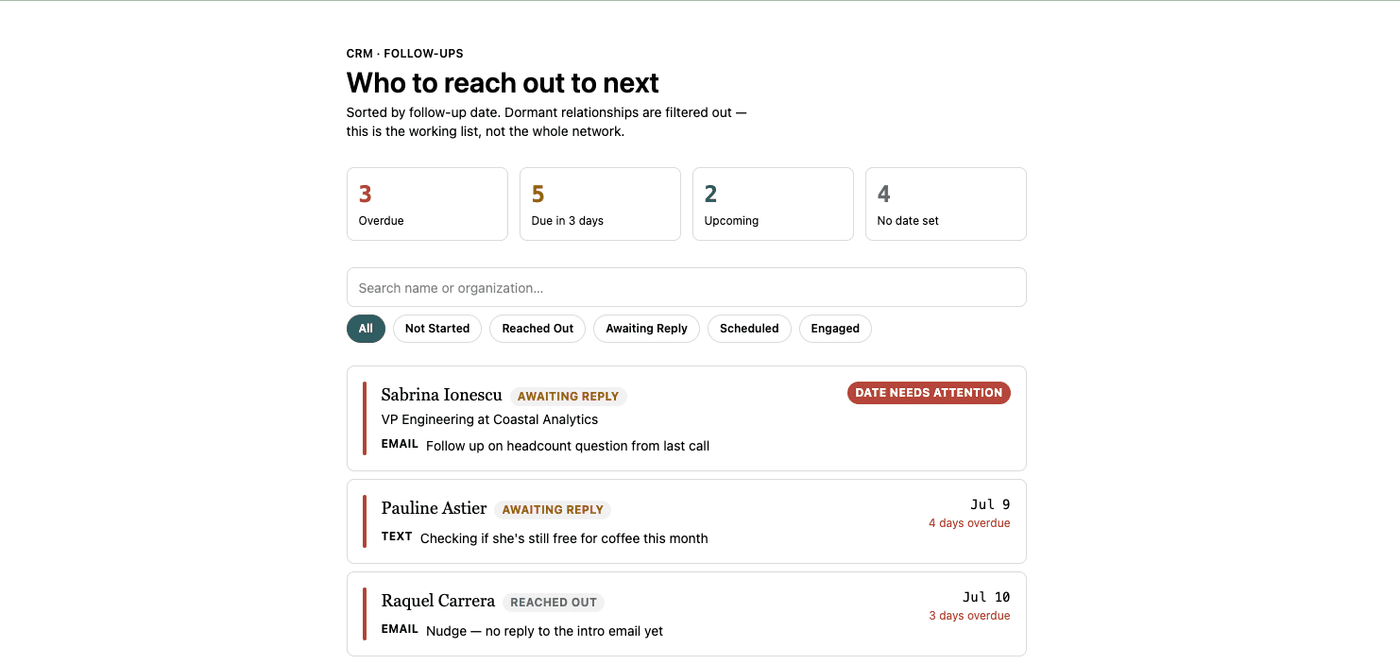
And you can see our type modeling at work: the first entry's last OutreachDate was set as July 46 2026, and the UI draws our attention to this error quickly.
With just a couple hours' of work, I have the beginnings of my very own CRM. It only runs locally on my machine in a container, but once it has authentication and authorization, I can host it in a VM and access it from anywhere.
Next I’ll add editing, contact creation, reminders, and automated outreach suggestions. The long-term goal isn’t to compete with Salesforce. It’s to have a CRM that does exactly what I need, and nothing more.
Do you want to automate your internal workflows? Reach out! Get in touch.